
tl;dr: At Resilens, we introduced reusable agent skills. I built one that generates C4 diagrams and a local interactive HTML explorer for architecture review. See the NanoClaw example.
A year ago, I wrote about how to create architecture diagrams with AI. In AI terms, that feels like a century ago. Back then, agentic AI was not mainstream, and we mostly used chat interfaces and copy-and-paste workflows.
With the arrival of agentic tools like Claude Code and Codex, this can now be much more practical and automatic.
Being the technical co-founder of a startup, I wanted a quick, reusable way to generate C4 architecture diagrams for any code repo I come across and package them into a reviewable artifact that helps people understand a codebase faster.
So I built a c4-diagrams skill, which you can check out in our GitHub
repo. It renders C4 diagrams and generates a local interactive HTML
explorer that groups system context, container, component, deployment, and
sequence views in one place.
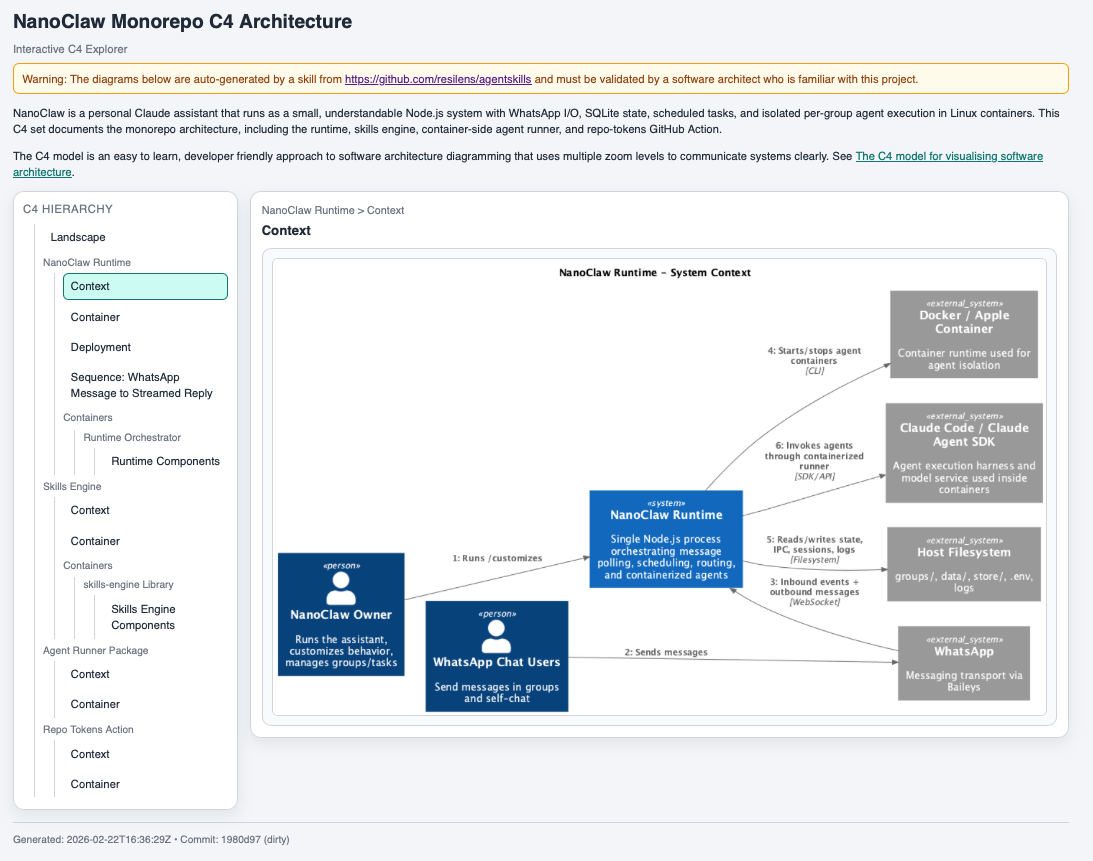
Here is an automatically generated architecture explorer. I will explain the example below.
This is a good demonstration of agentic AI doing something meaningful and harmless: not replacing architecture decisions, but improving the quality and speed of human architectural review. And yes, while building this skill, I was again stuck in some kind of an AI emotional loop.
What is a skill (and how is that different from MCP)? 🔗
Let's back up a bit: what is a skill? Basically, it is a reusable local workflow for an AI agent.
In practice, a skill bundles instructions (SKILL.md), scripts, templates, and conventions so the agent can reliably perform a task the same way every time. In this case, the task is to generate and render C4 diagrams, validate them, and produce a browsable output.
An MCP (Model Context Protocol) server solves a different problem. MCP is about giving the model access to tools and data sources (files, APIs, databases, services) in a structured way.
A simple way to think about it:
- MCP = how the agent connects to capabilities and context
- Skill = how the agent applies a repeatable method to solve a class of problems
They complement each other. You can use MCP to access a repo and tools, and a skill to turn that access into a reliable architecture-documentation workflow.
At Resilens, we have started writing skills for internal and external use, and we plan to publish public ones in the same GitHub repo.
What the c4-diagrams skill does 🔗
The skill is built around C4-PlantUML and a local render wrapper. In practice, it does a few useful things:
- renders common C4 architecture diagram types based on the content of the rpero or folder you are in.
- generates an interactive explorer HTML page for reviewing diagrams on one page
- supports both small repos and larger multi-system repos (via an optional manifest)
- adds traceability metadata to the generated explorer (timestamp + commit hash)
- supports C4-styled sequence diagrams by default (including boundary syntax with
Boundary_End())
The explorer is intentionally review-oriented. It includes:
- a warning that diagrams are auto-generated
- a reminder that they must be validated by someone who knows the project
- a short project summary (from
README.md) - a short C4 explanation and link
- fullscreen viewing for diagrams
- provenance footer (UTC generation time + commit hash)
That combination makes the output much more usable than a folder of images.
To use the skill, start Codex or Claude Code in the repo of your choice and ask something along the lines of "Please create a C4 architecture diagram of this repo". You can add more direction about where you want to focus, but this will already give you some meaningful output.
Why I tested it on NanoClaw 🔗
I tried it on NanoClaw, a recent ~500-line Claude agent that wraps WhatsApp automation in OS containers and calls it a security revolution, basically OpenClaw for people who think fewer dependencies make the alignment problem go away.
Here again is the link to the C4 architecture explorer. Feel free to explore the architecture by choosing a level on the left and clicking on the image for details. Note that I have not validated the correctness of the diagram, so the warning on the page is important:
Warning: The diagrams below are auto-generated by a skill from https://github.com/resilens/agentskills and must be validated by a software architect who is familiar with this project.

NanoClaw was mostly a tongue-in-cheek choice because of the current hype around OpenClaw. That hype also comes with real concerns. Projects in that space raise serious questions about misuse, safety, and operational risk (I have not installed or used it).
That is exactly why I like this example: the c4-diagrams skill points agentic AI in the opposite direction. It is a low-risk, high-utility use case focused on documentation, review, and human understanding.
The output looked good enough to discuss architecture in a structured way, which is the bar I care about: not "perfect diagrams," but useful review artifacts.
Why this matters (to me) 🔗
There is a lot of discussion about agentic AI doing ambitious, risky, or overhyped things. I think there is real value in the opposite pattern too: use agents to produce artifacts that improve shared understanding, expose assumptions, and make human review easier.
This C4 skill is one example. It does not make architectural decisions. It helps humans inspect them. That feels like a good direction.
If you are experimenting with AI-assisted engineering workflows, I would encourage you to look for problems like this: useful, bounded, reviewable, and low-risk.
Do you want to work at Resilens? 🔗
Final shameless plug: do you want to create more skills at Resilens, both for the company and for your own growth?
Please visit our Careers page. We have only just started, and we are currently looking for a senior software engineer in Berlin.
Would this be for you?